Laptop Battery Replacement SAME-DAY BATTERY INSTALLATION MacBook • Dell • HP • Lenovo • Asus • Acer • Samsung
SSD Upgrade Service FASTER BOOT & LOAD TIMES Hard Drive Imaging • Data Migration • Performance Boost
MacBook Air & Pro APPLE OEM BATTERIES IN STOCK M1 • M2 • M3 • M4 • M5 • Intel Models
Windows PC Laptops ALL BRANDS REPAIRED Dell • HP • Lenovo • Asus • Acer • Samsung • MSI • Toshiba

Laptop Battery Replacement & SSD Hard Drive Upgrade

Expert battery replacement and SSD upgrade service for MacBook, Dell, HP, Lenovo, Asus, Acer, Samsung and more. Same-day onsite installation • Free diagnostics • 90-day warranty on Apple

Laptop Battery Replacement and SSD Upgrade Service Fort Lauderdale

Is your laptop battery dying? Need a speed boost? We've got you covered.


Complete Computer Repair is South Florida's trusted source for laptop battery replacement and SSD hard drive upgrades. We stock most MacBook Pro and MacBook Air batteries for same-day installation. For Dell, HP, Lenovo, Asus, Acer, Samsung, MSI, and other Windows laptops, we can order and install a genuine replacement battery quickly. We also specialize in SSD upgrades – the single best performance upgrade you can make to an older computer.

Our expert technicians perform hard drive imaging and data migration to ensure all your files, programs, and settings are transferred to your new SSD. We test and verify everything works perfectly before we leave.

Call us today for a free quote: (754) 234-5598

Laptop Battery Replacement – MacBook, Dell, HP, Lenovo & More

If your laptop battery fails, won't hold a charge, or swells, we can replace it quickly. We stock most MacBook Pro and MacBook Air batteries for same-day installation. For Windows laptops, we can order and install a replacement within 1-3 days.

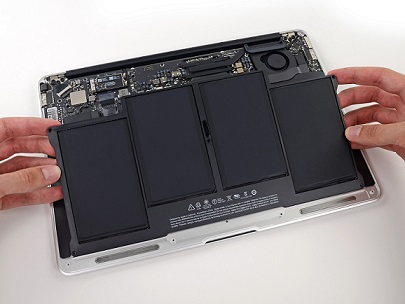
MacBook Battery Replacement

We stock OEM and high-quality aftermarket batteries for MacBook Air and MacBook Pro models including M1, M2, M3, M4, M5, and Intel-based systems. Same-day installation available.

Starting at $125

Dell Battery Replacement

Battery replacement for Dell Inspiron, Latitude, XPS, Precision, and Alienware laptops. We source genuine Dell batteries or high-quality alternatives.

Starting at $99

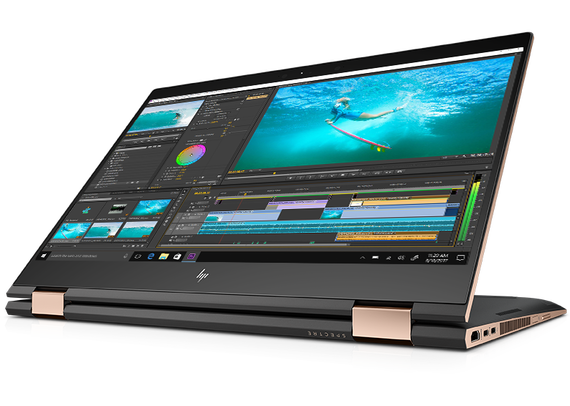
HP Battery Replacement

Battery replacement for HP Spectre, OMEN, Pavilion, Envy, and EliteBook laptops. Fast turnaround with genuine HP batteries.

Starting at $99

Lenovo Battery Replacement

Battery replacement for Lenovo ThinkPad, IdeaPad, Yoga, and Legion laptops. We use genuine Lenovo batteries for reliable performance.

Starting at $99

Asus Battery Replacement

Battery replacement for Asus ROG, ZenBook, TUF, and VivoBook laptops. Genuine Asus batteries with full warranty.

Starting at $99

Acer & Samsung Battery Replacement

Battery replacement for Acer Predator, Nitro, Aspire, Swift and Samsung Galaxy Book, Odyssey laptops. Quality batteries with quick installation.

Starting at $129

Same-day battery replacement available for most MacBook models. We also offer free pickup and delivery in Broward, Miami-Dade, and Palm Beach counties.

Laptop Battery Replacement and SSD Upgrade Service
Professional Laptop Battery Installation

SSD Hard Drive Upgrade & Data Imaging Service

Upgrade your laptop with a Solid State Drive (SSD) for dramatically faster boot times, quicker application loading, and overall improved performance. We also sell and install mechanical hard drives for budget-conscious customers.

  • SSD Installation – We install brand-new SSDs from trusted brands (Samsung, Crucial, Western Digital, Kingston)
  • Hard Drive Imaging – We create an identical backup of your old hard drive so all program files, settings, and personal files are transferred
  • Data Migration – Your files, photos, documents, and applications are moved to the new drive
  • Performance Testing – We verify your system is running optimally before we leave
  • All Brands Supported – MacBook, Dell, HP, Lenovo, Asus, Acer, Samsung, MSI, and more

Why upgrade to an SSD?

  • Boot times: From 60+ seconds to under 15 seconds
  • Application loading: Programs open almost instantly
  • File transfers: Up to 10x faster than mechanical drives
  • Reliability: No moving parts = less chance of failure
  • Silent operation: No spinning disks or clicking noises

SSD Upgrade Service

DIY Battery Removal & Installation Instructions

If you're feeling brave and willing to take a very low risk on damaging your laptop, here are simple instructions for you to complete the removal and installation of your new battery.

1. Disconnect all power sources

Unplug the AC adapter and remove any USB devices.

2. Ground yourself

Create ground between installer and laptop to prevent accidental ESD discharge.

3. Remove the back cover

Depending on your model, you may need to remove the top palmrest or keyboard. Use proper screwdrivers and prying tools.

4. Disconnect all cables

Carefully disconnect all cables attached to the palmrest if unable to access the battery directly.

5. Remove the old battery

Remove screws or use a special tool to slowly pry up the battery if glued.

6. Install the new battery

Reconnect and secure the new battery with screws or glue to the body of your laptop.

7. Replace the back cover

Replace the back laptop cover and secure with the screws.

8. Test battery & components

Test battery/components on the board making sure nothing got shorted from electrical discharge.

Warning: If you're not comfortable with these steps, we recommend professional installation. We offer free pickup and delivery and same-day service.

Laptop Battery Replacement & SSD Upgrade for All Brands

We replace batteries and upgrade SSDs for all major laptop brands. In-stock batteries and SSDs for fast service:

Apple – MacBook Air, MacBook Pro, MacBook
Dell – Inspiron, Latitude, XPS, Alienware, Precision
HP – Spectre, OMEN, Pavilion, Envy, EliteBook, Victus
Lenovo – ThinkPad, IdeaPad, Yoga, Legion, LOQ
Asus – ROG, ZenBook, TUF, VivoBook, ProArt
Acer – Predator, Nitro, Aspire, Swift, Chromebook
Samsung – Galaxy Book, Odyssey, Chromebook
MSI – Titan, Raider, Stealth, Katana, Cyborg
Toshiba – Satellite, Portege, Tecra
Sony – VAIO Series
Gateway – Solo, Pro Series
Fujitsu – LifeBook, Stylistic, CELSIUS
Compaq – Presario, EVO, Armada
Panasonic – Toughbook

Battery Replacement & SSD Upgrade Pricing Flat Rate

Pricing is a guide – contact us for a firm quote. We offer free diagnostics and a no-fix, no-fee policy.

Service Price Range Warranty Turnaround
Apple MacBook Battery Replacement$125 – $19990 Days1‑2 Hours
Windows PC Laptop Battery Replacement$99 – $18990 Days1‑3 Days
Gaming Laptop Battery Replacement$129 – $19990 Days1‑3 Days
SSD Upgrade (Drive + Installation)$125 – $39990 Days1‑3 Days
Hard Drive Imaging & Data Migration$99 – $19930 Days1‑4 Hours
MacBook SSD Upgrade (Apple OEM)$199 – $49990 Days1‑3 Days

* Prices include labor and standard parts. Complex cases may vary – we'll quote before starting.

Battery & SSD Upgrade FAQ Top Questions

How long does a laptop battery replacement take?

Most battery replacements take 1-2 hours for MacBook models. For Windows laptops, we typically complete the replacement within 1-3 days depending on parts availability.

Do you use genuine Apple batteries?

Yes, we use genuine Apple batteries for MacBook models when available. We also offer high-quality third-party batteries with excellent reviews and warranty.

Will upgrading to an SSD make my computer faster?

Absolutely. An SSD upgrade is the single best performance upgrade you can make to an older computer. Boot times drop from 60+ seconds to under 15 seconds, and applications load almost instantly.

Do you transfer my data when upgrading to an SSD?

Yes, we perform a complete hard drive imaging and data migration. We clone your old drive to the new SSD, ensuring all files, programs, and settings are preserved exactly as they were.

What payment methods do you accept?

Cash, Credit Cards, Zelle, Cash App, Venmo, ACH, Checks, and Cryptocurrency (BTC, ETH, XRP, LTC, HBAR, VET).

Customer Reviews 5 Stars

"Ernesto replaced my MacBook battery and upgraded my SSD. My laptop feels brand new! He picked it up and dropped it off the same day. Highly recommend!"

— Sarah M. | Fort Lauderdale

"My Dell laptop battery was swollen and wouldn't hold a charge. Ernesto replaced it quickly and even gave me tips on extending battery life. Great service!"

— Michael R. | Miami

"The SSD upgrade on my HP laptop made it 10x faster. Ernesto cloned my hard drive perfectly and everything works flawlessly. Excellent work!"

— Lisa T. | Boca Raton

Read All Reviews

Need a Battery Replacement or SSD Upgrade Today?

Call us now for a free quote and same‑day service in South Florida or nationwide mail‑in.

(754) 234-5598

We reply within minutes • Free diagnostics • 90‑day warranty on Apple

Serving South Florida & Nationwide

Local onsite service: Fort Lauderdale, Miami, Hollywood, Pembroke Pines, Davie, Plantation, Weston, Coral Springs, Boca Raton, Delray Beach, Aventura, Hialeah, Miami Beach, and all of Broward, Miami-Dade, and Palm Beach counties.

Mail‑in service: We accept shipments from anywhere in the United States, Canada, Puerto Rico, and the Bahamas. Fast turnaround, insured shipping, and signature required upon delivery.

Mail‑in Repair Information